
Text Tools
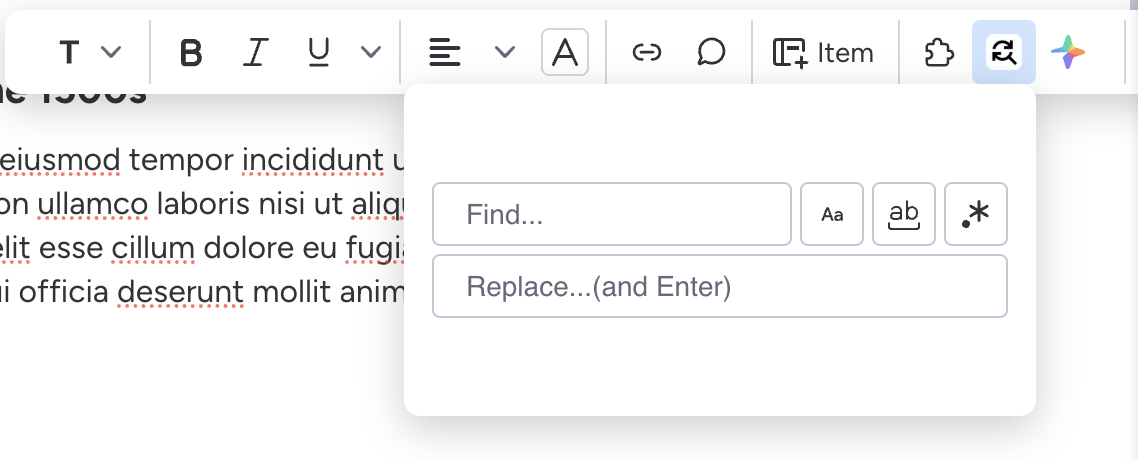
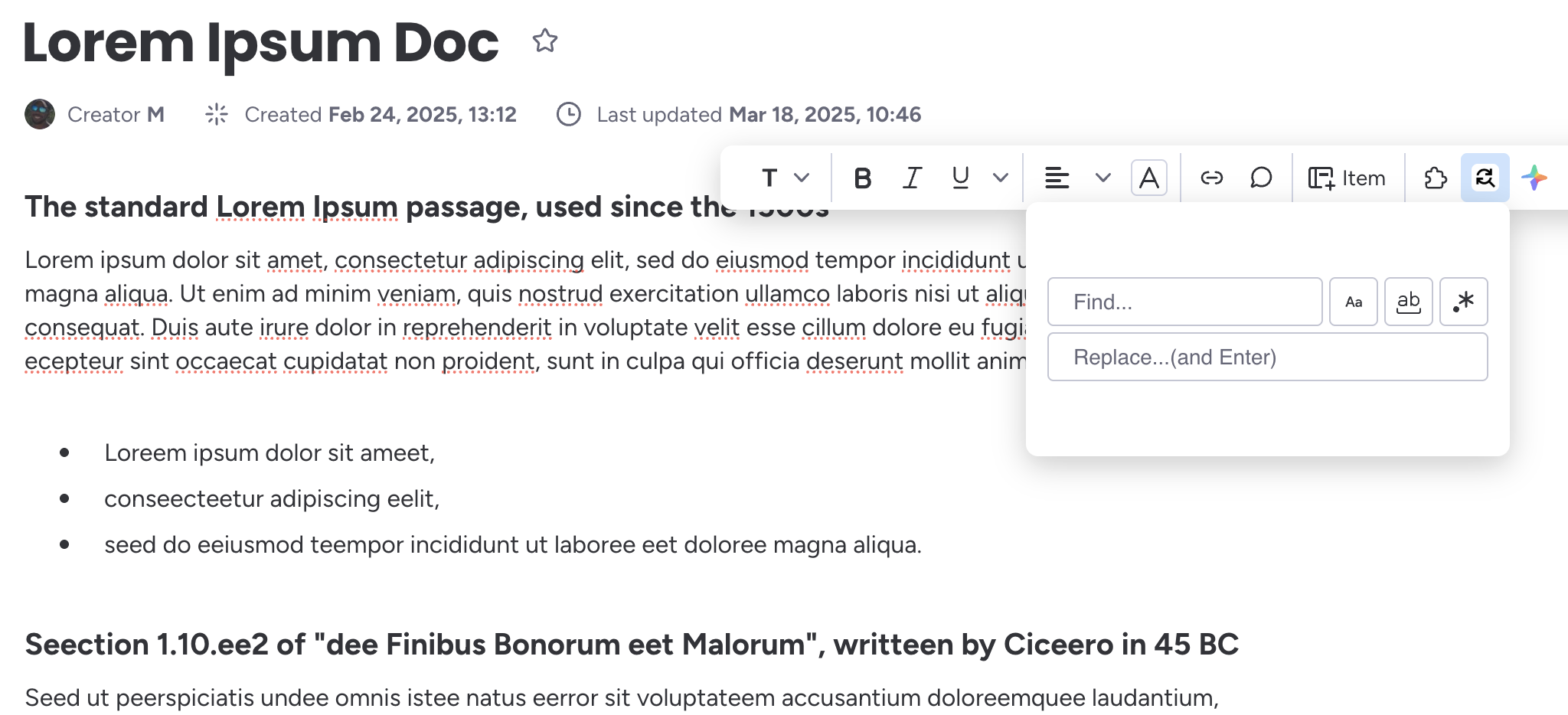
Easily find and replace text in a workdoc. It support case-sensitive searches.
It's very easy to use, just select the text you want to process and access the application from the context menu. Once the application appears, enter the text you want to search for and the replacement. Press Enter and voilá! The text gets replaced.
Installation
Quickly install the app using this button:

Pricing
We offer a 14 day free trial! If you like the app, if you think it could be useful for your team, we offer the following plans:
Wise
- Seats: Unlimited
- Price:
- $3/month (billed yearly)
- $4/month (billed monthly)
- Features:
- Unlimited access to find and replace text, and its updates.
Terms of Service
-
Introduction
Welcome to Find and Replace app ("the App"), a monday.com application that enables users to search and replace text in WorkDocs documents. By installing, accessing, or using the App, you agree to be bound by these Terms of Service ("Terms"). If you do not agree with these Terms, do not use the App. -
Acceptance of Terms
By using the App, you affirm that you have the legal capacity to enter into these Terms and that you comply with all applicable laws and regulations. If you are using the App on behalf of an organization, you represent that you have the authority to bind that organization to these Terms. -
Description of Service
The App provides a tool for users of monday.com to search for and replace text within WorkDocs documents. It does not store, retain, or modify content outside of the user's control within monday.com. The App requires appropriate permissions to access WorkDocs documents, and by using the App, you grant such permissions. -
User Responsibilities
You agree to:- Use the App only for lawful purposes and in compliance with monday.com’s terms and policies.
- Ensure you have the necessary permissions to modify WorkDocs content.
- Not use the App to introduce harmful code, automate unauthorized modifications, or violate intellectual property rights.
-
Data Privacy and Security
The App does not store or collect user data outside of monday.com. All processing occurs within monday.com’s platform, and any changes made via the App remain within the user’s workspace. We do not share or sell user data. For more details on how monday.com handles data, please refer to monday.com’s privacy policy. -
Limitation of Liability
To the maximum extent permitted by law, [Company Name] is not liable for any indirect, incidental, special, or consequential damages, including but not limited to data loss, unauthorized modifications, or business disruptions resulting from the use of the App. -
Warranty Disclaimer
The App is provided "as is" without any warranties, express or implied. We do not guarantee that the App will be error-free, uninterrupted, or meet your specific needs. -
Modification of Terms
We reserve the right to update or modify these Terms at any time. Changes will be posted within the App or on our website, and continued use of the App after modifications constitutes acceptance of the revised Terms. -
Contact Information
For any questions or concerns about these Terms, please contact us at montools@proton.me or visit our website at montools.github.io.
Privacy Policy
-
Introduction
Welcome to Montools Find & Replace for WorkDocs ("the App").This Privacy Policy outlines how we handle user data when you use the App within monday.com. -
Data Collection & Usage
The App does not collect, store, or transmit any personal or document data outside of monday.com. All search and replace actions occur within the monday.com environment without external data processing. -
Permissions & Access
To function correctly, the App requires access to monday.com WorkDocs. This access is used solely for executing search and replace operations as initiated by the user. The App does not retain, analyze, or share document data. -
Data Security
We follow best practices to ensure that user data remains secure. The App operates entirely within monday.com's infrastructure and does not introduce additional data storage, logging, or external processing. -
Third-Party Integrations
The App does not integrate with external third-party services and does not transmit any user data outside of monday.com. -
User Rights & Control
As the App does not store any personal or document data, users do not need to request data deletion or modification. All content remains under the control of the user within their monday.com account. -
Changes to This Policy
We may update this Privacy Policy from time to time. Any changes will be communicated within the App or through our website. Continued use of the App after changes constitutes acceptance of the updated policy. -
Contact Information
For any questions regarding this Privacy Policy, please contact us atmontools@proton.me .
Frequently asked questions
-
What does this app do?
This app allows you to quickly find and replace text inside monday.com Workdocs, making it easy to edit and update content efficiently. -
How do I use the app?
Select a portion of text in your Workdoc, and the app will appear in the contextual toolbar. From there, you can enter the text to find and the replacement value. -
Can I find and replace in the entire document?
No. The app currently operates only on the selected portion of text to ensure precise and controlled editing. -
Does the app support case sensitivity?
Yes. You can choose whether the find operation should be case-sensitive or not, depending on your needs. -
Can I preview the changes before applying them?
Yes. The app shows a preview of the result before committing the replacement to ensure accuracy. -
Will it replace all occurrences or just the first?
You can choose between replacing all matches or only the first instance within the selected text. -
Is the app safe to use with sensitive content?
Yes. All processing happens locally in your monday.com Workdoc. The app does not store or transmit any of your content. -
Where is the app available?
It appears in the contextual toolbar when you select text inside a Workdoc. Make sure it's installed in your monday.com workspace. -
Who can I contact for support or feedback?
You can reach out to montools@proton.me, we'll be happy to know about you!